A story · setting it up, guided
A wizard sets it up with you.
It grew feature by feature. Nobody should have to meet all of it at once.
Before
It started as a simple calendar… then it grew and grew.
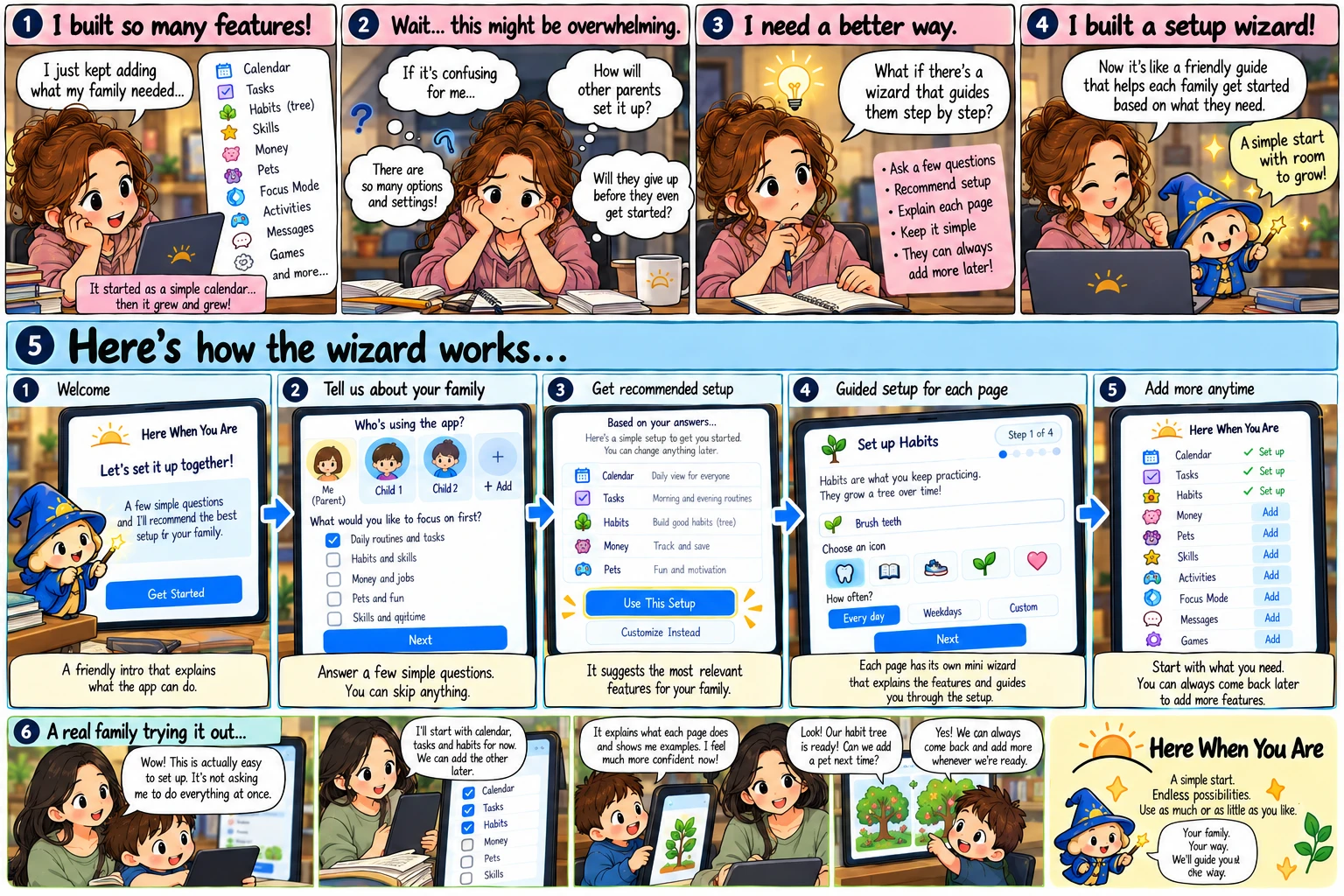
1“I built so many features!”
It started as a simple calendar… then it grew and grew. Tasks. Habits. Skills. Money. Pets. Focus mode. Activities. Messages. Games. I just kept adding what my family needed.
2“Wait… this might be overwhelming.”
If it's confusing for me, how will other parents set it up? There are so many options and settings. Will they give up before they even get started?
3“I need a better way.”
What if there's a wizard that guides them step by step? Ask a few questions. Recommend a setup. Explain each page. Keep it simple. They can always add more later.
4“So I built a setup wizard.”
Now it's like a friendly guide that helps each family get started based on what they need. A simple start, with room to grow.
After
A few questions, a setup that fits, and a wizard on every page that has something to set up.
1Welcome.
“Let's set it up together.” A few simple questions, and it recommends the best setup for your family. A friendly intro that explains what the app can do.
2Tell it about your family.
Who's using it — you, and the children you add. What would you like to focus on first: daily routines and tasks, habits, money and jobs, pets and fun? Answer a few simple questions, and skip anything you like.
3Get a recommended setup.
Based on your answers: a daily view for everyone, morning and evening routines, a habit to build. Use this setup, or customise instead — and change anything later.
4Guided setup, one page at a time.
“Habits are what you keep practising. They grow a tree over time.” Name one, pick an icon, choose how often. Each page has its own wizard that explains what the page is for and sets it up with you — beside the gear that changes what the page shows.
5Add more any time.
Start with what you need. Money, pets, skills, goals and the rest are switches that stay off until a real week asks for one — and when it does, you set it up from that page, not from a settings screen.
A simple start, with room to grow.
The first run of Here When You Are asks seven short questions and leaves you with a board that already works. After that, setting something up never means hunting through settings: open the page you want and press the wizard beside its gear — the gear changes what that page shows, the wizard sets something new up on it. A page with nothing to set up doesn't show the button at all. Use as much or as little as you like.
Your way.
I'll guide the way.